Skip to content
UltimateMacro

Roblox / Tower Defense Simulator / Automation

Record it once.Run it all night.

Ultimate Macro: The New Era is a free, open-source automation tool for Roblox Tower Defense Simulator. Play a run yourself once and it saves every placement, upgrade, ability and target change as a strategy file — then replays that run, rotates between strategies and recovers from disconnects while you are away.

Latest
v1.3.4b
Platform
Windows 10 / 11
Runtime
AutoHotkey v2.0
Licence
GPL-3.0 free
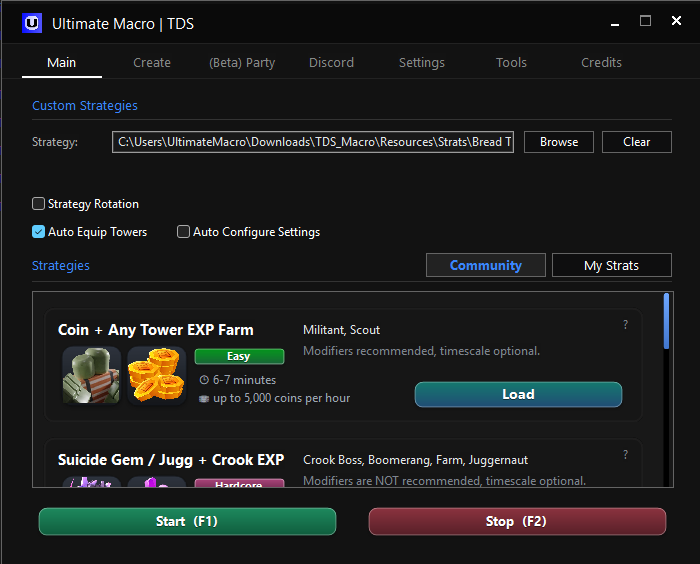
The Ultimate Macro window: a strategy file field with Browse and Clear buttons, a
								list of community strategies with their map, difficulty and income, and Start and
								Stop buttons.

The Ultimate Macro window, running on Windows.

What it does

Four phases of a run

Ultimate Macro is not a mouse recorder. It reads TDS menus, tower state and match flow through image detection and OCR, so each phase of a run is handled on its own terms.

Record

01

Play the run yourself once. Every action becomes a reusable .strat file.

8 capabilities
  • Tower placement, upgrades and selling
  • Split upgrade paths
  • Call of Arms, Drop the Beat, Support Caravan
  • Raise the Dead (Necromancer) and Brawler reposition
  • Tower target changes and cloning
  • Wave-based custom DJ disc schedules
  • Auto Skip on the waves you choose
  • Map, mode, modifiers and required towers

Run

02

Loop a strategy for hours, or rotate between two of them.

7 capabilities
  • Strategy Rotation after N runs or minutes
  • Goals with smart compatible-strategy selection
  • Auto Equip the towers a strategy needs
  • Community .strat downloads in-app
  • Party and VIP server support
  • 1.5× and 2× Timescale
  • Daily and playtime reward collection

Recover

03

Losses, lag and disconnects are handled instead of ending the session.

7 capabilities
  • Pre-run diagnostics before a session starts
  • Resume-aware startup from the lobby or Ready screen
  • Reconnection and automatic game re-entry
  • Clicks Restart on a loss, Play Again on a win
  • Checks the map on join and reloads if it is wrong
  • Optional Auto Configure Settings for Roblox
  • Potato Mode and Legacy Mode

Report

04

Watch a session you are not sitting in front of.

6 capabilities
  • Discord webhook with real-time logs
  • Currency and session statistics
  • Automatic screenshots, plus Triumph and Loss
  • Official Discord Remote Control via EngineerBot
  • Profile Manager for settings, hotkeys and strategies
  • Debug logs from the run

Everything runs locally as an AutoHotkey script on your own machine. Nothing is injected into Roblox and no account is needed — it reaches the network only to fetch community strategies and to talk to the Discord webhook and remote control you set up yourself.

Before you start

Detection needs a
predictable screen

Ultimate Macro reads the game the way you do — through image detection and OCR. These are the settings that matter most. The macro lists the full set the first time you run it, and the guide explains what each one is for.

Windows 10 or 11
AutoHotkey v2.0
Windows display resolution 1920×1080
Windows display scale 100%
TDS UI Scale Large
TDS Screen Shake off
TDS Vertical Upgrades on
Roblox 60 FPS, Classic camera
OCR pack English (US)
Taskbar visible

Questions

Common questions

Setup and troubleshooting live in the guide. These are the ones people ask before downloading.

Q01 Is it free, and is the source public?

Yes to both. Ultimate Macro is released under the GPL-3.0 licence and the whole project is on GitHub, including every release. There is nothing to pay for and no account to create.

Q02 Do I have to write strategies by hand?

No. Open the Record tab, set the map and mode, press Start Recording and play a run normally — the macro writes the .strat file for you. You can also browse and download community-made .strat files from inside the macro, shared through the Discord.

Q03 Is it a virus? What does it actually do to my PC?

It is an AutoHotkey v2 script that moves your mouse, presses keys and reads your screen with image detection and OCR. It does not inject code into Roblox or modify the game. It reaches the network only to fetch community strategies and to talk to the Discord webhook and remote control you configure yourself. Antivirus software sometimes flags automation scripts in general — the full source is public if you want to check it.

Q04 What resolution do I need?

A 1920×1080 Windows display resolution is required — that is what the macro's image detection is built around — with Windows display scaling set to 100%. Note that this is your Windows resolution, not a setting inside Roblox.

Q05 Can I use the PC while it runs?

No. The macro drives the real mouse and keyboard and needs the Roblox window where it left it, so the machine is busy for the whole session. Set up a Discord webhook if you want to watch progress from your phone instead.

Q06 Who makes it, and where did it come from?

Ultimate Macro was started on 30 March 2026 by Darksen. The New Era is the continuation of that project, maintained by a new team. Full credits are further down this page.

Q07 Is this affiliated with Roblox or TDS?

No. Ultimate Macro is an independent, community-built project. It is not affiliated with, endorsed by or connected to Roblox Corporation or Paradoxum Games.

Project

Community & credits

Ultimate Macro is built in the open by players, for players. Bug reports and strategy shares are welcome.

Team

Original creator — Darksen
Lead developer — itzshovel

Developers

aidenbanana.devkronoxxvpizzaroles24salkannyoshiziadod

QA

frostzzzmenz7nytlitristanm1ce

Origin & licence

Ultimate Macro was originally created by Darksen and The New Era continues that work. Original repository: DarksenDev/tds-macro — support him on DonationAlerts.

Released under the GNU General Public License v3.0. You may use, modify, fork and redistribute it under the licence terms while preserving the copyright, licence and attribution notices.

Automation carries risk. Ultimate Macro is a third-party tool and is not endorsed by Roblox Corporation or Paradoxum Games. Use it at your own discretion.

This is the New Era

Stop replaying.
Start recording.

Free, open source, and built by people who play the game.